For the person responsible for recording a delivered session. You need the existing booking, completed preparation and the correct attendance answer.
Quick steps
- Open the existing session. Choose Record session, Resume session or Continue session, as offered.
- Check the person, date, staff and plan before editing.
- Complete the actual times, outcome, ratings and account of what happened.
- Read Session summary and Actions taken for accuracy.
- Use Save & exit when you need to return to a draft.
- Resolve the form’s missing answers, then choose Submit for sign-off.
- Reopen the item and check its state. Follow any separate concern warning.
If it goes wrong
Read the message before trying again. Reopen the correct record and check what was saved. Ask your manager if access or responsibility is unclear.
Where this fits in the workflow
The plan records what you intend to do. Attendance records whether it happened. The write-up records the actual activity, response, support and progress.
Start from the existing booking. If recording is unavailable, check preparation, attendance and your role. Submitted or signed work is not an editable draft.
If it did not happen, complete the non-delivery questions instead. Do not invent a delivered account to move a card along.
Start with the existing plan
Work on the session that was planned for this visit. Creating a second item can separate attendance, evidence and sign-off from the original plan.
Check the record identity, date and assigned staff. Similar names and neighbouring dates are easy to confuse. If the plan is wrong, resolve that before filing the account.
Planned times and actual times
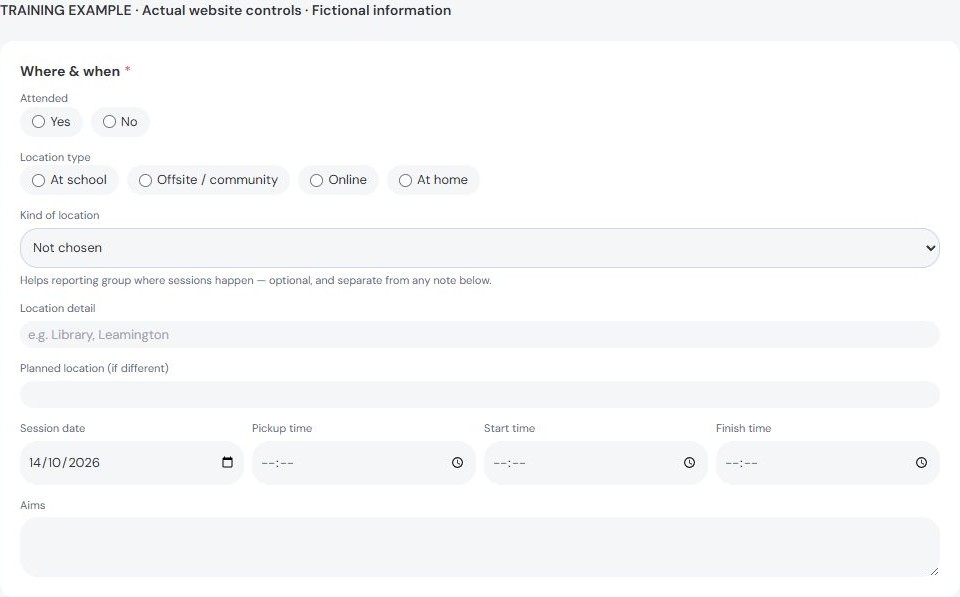
The plan describes what you intended. The write-up records what actually happened. Pickup and start may be filled from the plan; correct them when needed.
Finish time starts empty so you actively record it. Check the whole sequence, including any travel or pickup information the form requests.
Do not alter the actual times just to make an overlap warning disappear. Explain or resolve the scheduling issue with your manager.
Attendance, goals and ratings
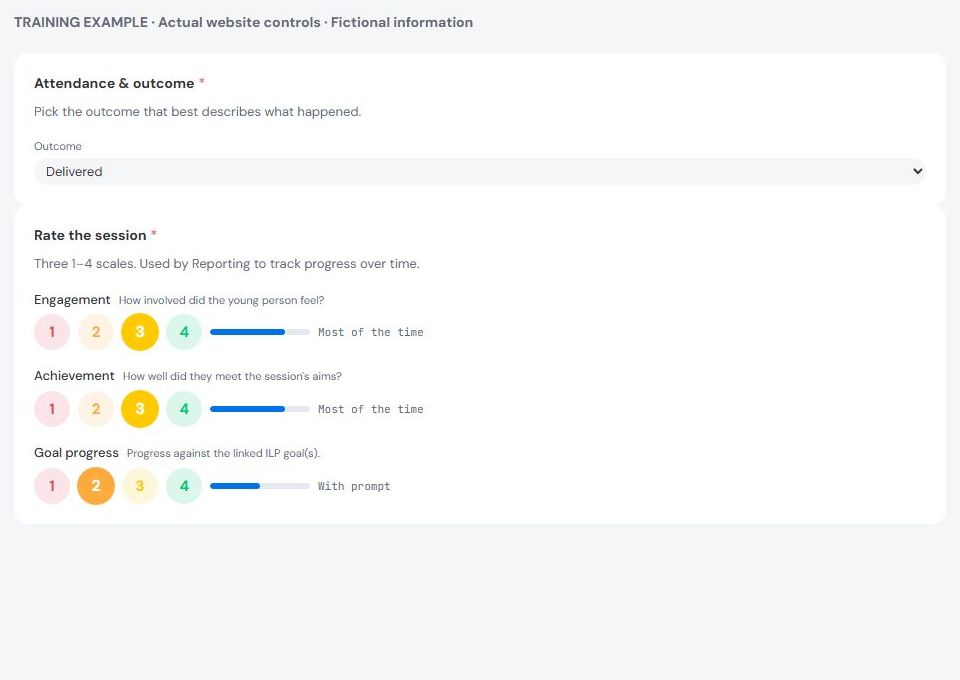
Select the outcome that matches the visit. If it did not happen, complete the reason and any safety questions shown. Do not invent activity to complete a delivered account.
Use the linked ILP goals to explain what you worked towards. Describe observable progress and the support needed. A difficult visit can still provide useful evidence.
Read each rating scale before choosing. Ratings should agree with the written account. A high score needs supporting observations; a low score needs enough context to understand it.
Write a clear factual account
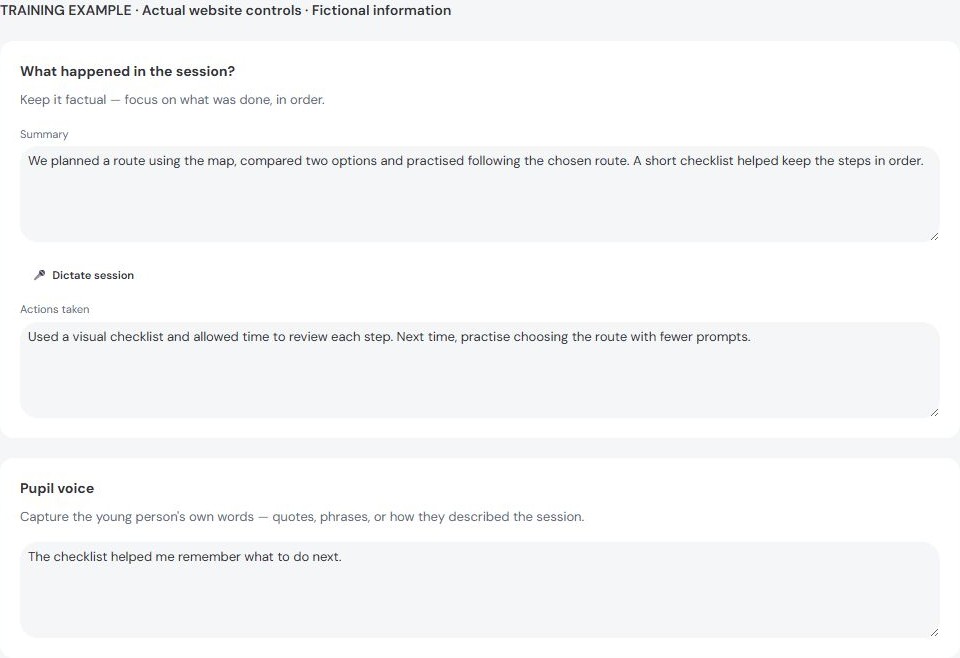
- In Session summary, describe the activity and what happened in a useful sequence.
- In Actions taken, record your response, adjustments, support and agreed next steps.
- Separate direct observation from what someone told you. Attribute information without presenting it as something you witnessed.
- Keep the young person's own words clear. Use quotation marks only when you can accurately quote them.
- Complete the other cards shown, including voice, positive observations and welfare information.
If you use dictation, check the proposed text before accepting it. Correct names, dates, negation and meaning. Spoken words can be transcribed incorrectly.
Draft, submission and sign-off are different
Save & exit keeps work for later; it does not request sign-off. Submit for sign-off sends the completed account into the checking workflow.
Follow the missing-answer list rather than repeatedly pressing submit. When the form reports conflicting edits, compare the versions and speak to the colleague involved.
After submission, check the state on the record. If returned, read the reason, correct the requested points and send it again. A signed account has a different correction workflow.
Correct a returned write-up
Read the return reason before editing. Open the original booking and choose Make requested changes. Keep the original account together instead of creating another.
Correct the requested points and check connected answers, such as times, ratings and the narrative. Explain any uncertainty rather than guessing.
Use Resubmit for sign-off when ready. Saving a draft keeps your changes for later; it does not ask the checker to read them again.
Reopen the item and confirm it is waiting for checking. If already signed, ask for the proper correction process instead of replacing the record.
Concerns need their own confirmation
A submitted write-up is not proof that a linked concern was raised successfully. Read any separate warning and follow its recovery instructions.
Use the concern workflow when needed. Immediate safety action must not wait for a write-up or sign-off. Contact the responsible DSL using your organisation’s procedure.
If connection or saving is uncertain
Keep the page open and read the recovery message. Before retrying, check whether the existing item already shows your submission. Avoid creating a replacement record.
Tell support the time, page, action and error wording. Keep children’s names and confidential narrative out of ordinary support messages.