Use the screen guide
Press the information button beside the page actions or tabs. Move through the steps to highlight each part of the current screen. The guide changes for Open, Recently closed, Cases and Contacts & routing.
Act first when somebody may be unsafe
Follow your organisation’s emergency and safeguarding procedure. Contact the responsible DSL directly when urgent action is required. Do not wait for somebody to notice a queue item.
From concern to continuing work
Use Record a concern for the first factual report. The original account is retained. Use New case only when related concerns or several owned actions around the same young person need one continuing record.
Access stays restricted
The signed-in person sees only the records their role and organisation permit. Opening or linking a case never gives somebody access to an underlying concern they could not already read.
The complete record flow
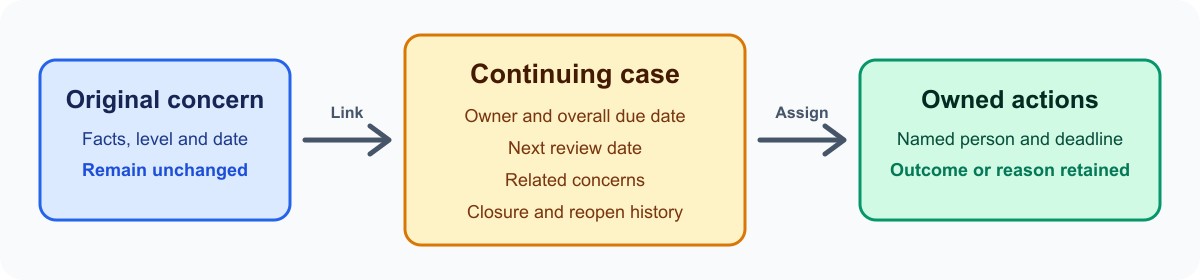
A concern records what was seen, heard or reported and the first response. It should remain the source record for that event. Later notes, actions and external reports add to its history instead of silently rewriting the first account.
A case coordinates continuing work. It has one accountable owner, an overall due date, a next review date and individually owned actions. Several concerns about the same young person may be linked when they genuinely belong to the same continuing work.
What each tab is for
- Open is the active concern queue. Use it to read new reports, acknowledge them, assign responsibility and record immediate action.
- Recently closed is a short look-back. Closure retains the record and its audit history; it is not deletion.
- Cases is the continuing-work register. It highlights due dates, reviews and open actions without putting protected narrative into the list.
- Contacts & routing maintains responsibility for new work and the internal or external contacts staff may need.
Read workload totals carefully

Counts show records visible to the current account. They can highlight missing ownership, overdue follow-up or work awaiting acknowledgement, but they do not contain the facts or decisions. An empty filtered view does not prove that no other concerns exist.
Use the board to see how work is distributed and the list for a denser queue. Apply filters deliberately. In the case register, press Apply after choosing filters and use Clear filters before deciding that a case is absent.
Who can do what
- A mentor can raise a concern and see work made available through the organisation’s access rules. They should use direct contact as well when the situation is urgent.
- An authorised DSL or manager can work the wider concern queue, take ownership, record decisions and manage continuing cases.
- An authorised admin can maintain configuration available under Manage, but administration does not remove the need for a legitimate role to read protected narrative.
- Every view remains tenant-scoped. A copied link does not bypass role checks, and access to a case does not expand access to its linked concerns.
Ownership, actions and deadlines
Make responsibility explicit. A concern follow-up belongs to that concern. A case action belongs to the continuing case. Each action should describe one concrete next step, one accountable owner and a realistic due date.
Complete an action with a useful outcome. Cancel it only when it is no longer required and record why. Do not move a date or close work simply to clear an overdue counter.
Closing, reopening and corrections
Read the concern or case before closing it. Record why the work is complete and who owns anything that continues elsewhere. A case cannot close while active actions remain. Reopening keeps the earlier outcome and adds the new reason, owner and dates.
Removing a concern from a case does not erase the historical link. If a save reports that somebody else changed the record, read the current version before entering the intended change again. Do not share accounts or copy protected narrative into ordinary email or chat to work around access.
Unfinished work and safe recovery
An unfinished welfare item means work was started but no concern was submitted. Follow it up with the named person. A local draft is not evidence that the DSL has been notified.
When the app is unavailable, use the organisation’s fallback procedure and direct contact route. Record the facts through the approved process as soon as possible. For an access or data problem, note the visible reference and time without copying protected narrative into the support request.